
Blog
IGET S3 Pods vs S3 Devices: Complete Flavour and Price Guide


This guide explains the two IGET S3 listings at Halo E-Vape and keeps them straight: the IGET S3 pods listing (25 flavour options, SKU-linked to the 10K pod) and the separate IGET S3 devices listing (5 colourways). Because S3 is a pod system rather than an all-in-one disposable, the pod page and the device page answer different purchase intents â and neither should be treated as evidence about what the other contains. Reviewed against the live listings on 10 October 2026. For the wider range, browse the IGET brand page.
Two listings, two intents: pods vs devices
The first decision with IGET S3 is item type, not flavour. The catalogue maintains separate SKU references for the pod product and the device product, and an S3 pod listing does not automatically include the device. Only the exact product-page description can establish included contents, so read the page title and included-content wording before comparing flavours or colourways.
| IGET S3 POD 10K PUFF | IGET S3 POD DEVICES | |
|---|---|---|
| Item type | Replaceable pod (the flavour component) | Device (the battery component) |
| Options in selector | 25 flavour names | 5 colourway names |
| Displayed price (10 October 2026) | $24.98 (regular $35.00) | $19.98 (regular $32.00) |
| Live listing | IGET S3 POD 10K PUFF | IGET S3 POD DEVICES |
Treat product photography as orientation rather than inventory evidence: images may represent a family, while the selector and checkout are the current commercial references.
Complete IGET S3 pod flavours list
All 25 IGET S3 pod flavours below match the options currently attached to the S3 pod listing, grouped only by words that appear in the labels:
| Label group | Current names |
|---|---|
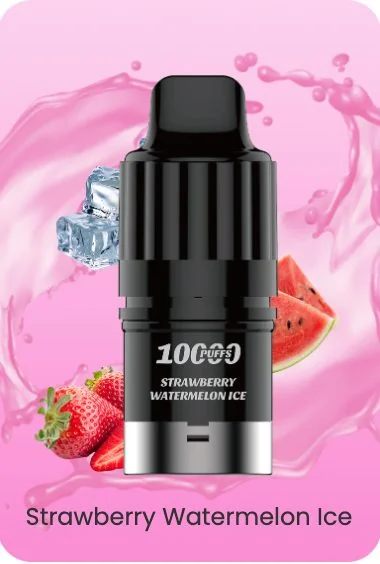
| Ice or cooling words | STRAWBERRY WATERMELON ICE; STRAWBERRY KIWI ICE; GRAPE ICE; BLACKBERRY ICE; PEACH LYCHEE LIME ICE; MANGO ICE; BANANA ICE; BLUEBERRY MINT; DYNAMIC MINT; COLA ICE; PEACH ICE |
| Chuppa Chupps labels | CHUPPA CHUPPS STRAWBERRY; CHUPPA CHUPPS GRAPE |
| Monster labels | MANGO MONSTER; LEMONADE MONSTER |
| Multi-fruit and other labels | CHERRY POMEGRANATE; STRAWBERRY RASPBERRY; BLACKBERRY PINEAPPLE ORANGE; RASPBERRY GRAPE MANGO; PASSIONFRUIT BLUEBERRY RASPBERRY; BLACK FOREST; BLACK POMEGRANATE CHERRY; BLUEBERRY RASPBERRY BUBBLE GUM; PASSION FRUIT KIWI GUAVA; STRAWBERRY POMEGRANATE |
Count check: eleven cooling-word labels, two Chuppa Chupps labels, two Monster labels and ten multi-fruit or other labels reconcile to the 25 reviewed options. Note the spelling as displayed â this selector writes the candy-style label “CHUPPA CHUPPS”, and writes “BLACK POMEGRANATE CHERRY” where other ranges use “BLACKBERRY POME CHERRY”. Transcribe labels exactly as shown when noting or searching an option.
Reading two cooling labels correctly
GRAPE ICE pairs a named fruit with the word Ice; BLUEBERRY MINT pairs a named fruit with the word Mint. The selector lists Ice labels and Mint labels as separate entries, so the words are doing different jobs in the naming. Treat them as label cues, not as a measured cooling level, and confirm you are on the pod listing â not the device listing â before comparing prices.
S3 device colourways
The device listing carries 5 colourway options rather than flavours: MYSTIC GUNMETAL, TIDAL GUNMETAL, CARBON GRAY, LIGHT PURPLE and ROSE PINK. The device is the battery component the pods attach to. If you are moving from an all-in-one disposable, the device is a one-time purchase decision; the pods are the recurring one.
Pod system vs all-in-one: where S3 sits
Within the IGET catalogue at Halo E-Vape, S3 is the pod-system family while ONE and BAR PRO are all-in-one disposables with their own separate listings and selectors. The practical difference: an all-in-one is replaced as a whole unit, while a pod system separates the battery device from the flavour pod. Compare formats before flavour names â a broad search phrase can compress the device decision and the pod decision into one, and the two live on different pages here.
If an all-in-one suits you better, the IGET ONE 12K flavours guide (23 options) and the IGET BAR PRO 10K flavours guide (24 options) cover those ranges. Keep each family’s SKU attached when comparing; shared flavour words across families do not make the products interchangeable.
How to check live S3 prices
A correct S3 price check covers both components when you need them. On 10 October 2026 the pod listing displayed $24.98 (regular $35.00) and the device listing $19.98 (regular $32.00). Because promotions and stock move, verify on the live pages:
- Confirm the item type. Pod listing or device listing â they are priced separately.
- Select the exact option. The flavour name on the pod page, or the colourway on the device page.
- Read the price and availability shown after that selection.
- Add both components if you need both. Compare order totals, not one component’s price against a complete setup.
- Recheck the checkout total, including delivery conditions, before ordering.
Frequently asked questions
How many IGET S3 pod flavours are listed?
25 in the pod selector reviewed on 10 October 2026. Availability moves, so the live pod listing is the final reference for what can be ordered.
Does an S3 pod listing include the device?
No â the catalogue keeps separate SKU references for pods and devices. Only the exact product-page description establishes what is included; check the page title and contents wording before ordering.
What colourways does the S3 device come in?
Five in the current selector: MYSTIC GUNMETAL, TIDAL GUNMETAL, CARBON GRAY, LIGHT PURPLE and ROSE PINK.
What is the current IGET S3 price in Australia?
On 10 October 2026 the pod listing displayed $24.98 and the device listing $19.98. Prices move with promotions; confirm both on the live pages before checkout.
Is S3 a disposable or a pod system?
S3 is a pod system: a rechargeable device plus replaceable pods. IGET ONE and BAR PRO are the all-in-one disposable families in this catalogue.
Are GRAPE ICE and BLUEBERRY MINT the same kind of pod?
Both are cooling-word labels, but the selector lists Ice and Mint entries separately. The words are naming cues; this guide makes no claim about cooling strength or taste.
Are IGET vapes regulated in Australia?
Nicotine vaping products in Australia are regulated by the Therapeutic Goods Administration, and state-level rules can add retail restrictions on top. Check the TGA vaping hub for the current national rules before ordering.
This guide was reviewed against the live S3 pod and device listings on 10 October 2026. It reports catalogue labels and item types only: no product use, no inferred ingredients, and no health claims. For the broader range, visit the IGET brand page or browse the full disposable vape collection.
